The ultimate transition to digital family photo collections is inevitable. Most original images being captured today are digital, many inherited print collections are being scanned and converted to digital as acquired, and digital files and new image services are opening a wide range of exciting preservation and sharing possibilities. Thursday, June 17, 2010
Usefulness of Digital Technology to Family Photo Collections
The ultimate transition to digital family photo collections is inevitable. Most original images being captured today are digital, many inherited print collections are being scanned and converted to digital as acquired, and digital files and new image services are opening a wide range of exciting preservation and sharing possibilities. Friday, May 28, 2010
Online Albums - A Word of Caution
Many families post digital images to online albums, including the sites of major online printers. These free and easy to use online albums can be very helpful in sharing images with friends and extended families. However, it is important not to rely solely on these free online albums as your digital image library backup.The fine print in many online album service agreements typically allows the provider to re-size and/or eliminate images, at their discretion. With the declining cost of storage, this is unlikely to become a problem. However, these online album providers can be subject to human, software, and hardware failures, and your family photos are simply too important to rely upon someone else as your primary backup.
As prices and sizes of memory formats, such as CDs, DVDs, and memory sticks, continue to decline, there are no good excuses for not having the bulk of your digital images duplicated and stored in a bank safe deposit box or other off premise location. It is just too easy, quick, and inexpensive to not make the effort to backup some of your most prized family possessions.
For more information on organizing, preserving, and sharing family photos, visit LocalArchiver.com.
Wednesday, May 12, 2010
Why Family Photos Are Important
Family photos and documents are often among a family's most prized possessions because they provide a tangible image link to the past.At some point in our lives, most of us will come to realize that our lives are more closely connected to generations past, present, and future than we previously appreciated. Connections to our past are important to developing and maintaining a sense of place, a sense of personal and local identity, and often add to our individual sense of purpose and belonging.
Much discussion is currently centered on “social networking”. The family remains our most important and core social network. Shared family experiences, memories, heritage, and often values and interests are reflected in family photo collections and provide a sense of connectedness as well.
A well organized and effectively shared photo collection can promote a clearer understanding of how our family ancestors influenced our thinking, and provide reminders of our personal history and development. A properly organized photo collection allows the next generation to better appreciate these important photo reflections of the past, and can help them to understand their heritage as well.
It was not long ago that most family photos were limited to professional studio portraits. As photography became more affordable and mainstream in the last century, families have routinely captured more images of their family history. Digital technology has now made image transfer and sharing much easier, and online databases are making genealogy research more fruitful than ever before. With the evolution of these tools, developing family histories and coloring that history with photo images has become a growing interest of many families.
Preserving our sense of place and family history is at the heart of why it is important to both preserve and share family photo images. Special family photos and documents simply help us to remember and better understand the uniqueness of our families and our individual journeys.
For more information on organizing, preserving, and sharing of family photos, visit LocalArchiver.com. The above blog is an excerpt from a book being assembled for publication this fall and based on articles at LocalArchiver.com.
Tuesday, April 13, 2010
Older Family Photo Albums May Create Problems
Take a good look at your existing albums, and look for signs of photo discoloring and fading. The problem may be in the materials that were used to make the albums.Many albums sold in the past were not made of archival materials and have damaged many older pictures. If you see signs of deterioration or have concerns, seriously consider upgrading to archival quality albums or scanning the album contents to make printed photo books.
Your albums likely contain the best of your photos, so the quality of the storage materials surrounding your very best photos should not be taken lightly.
The many older albums sold with black paper pages are often very acidic, and the laminated look "magnetic" albums widely available in the past are notoriously bad for photos. The picture above is an example of a bad magnetic album where air coming in on the edges has apparently fueled a chemical reaction with something used to manufacture the album. If the photos in such non-archival albums have not already been damaged beyond hope, it may be worth the effort to try to scan the pages or simply remove photos in these albums.
For discussion of what to look for in archival materials, see the article on Storing Original Photos at LocalArchiver.com. For replacement album solutions, visit the Photo Albums and Scrapbooks area at Blick Art Materials.
Tuesday, March 30, 2010
Make Your 35mm Slides A Part of The Family Photo Collection
In addition to photo prints and newer digital photos, many families have a bunch of 35mm slides that seldom come out of the closet. My family recently tackled the project of culling our slides and sending them off to be scanned in order to add them to the rest of the consolidated digital photo collection. Here are some observations and suggestions.1) To be most useful for printing, scans of 35mm slides require much higher scan resolution than prints, as the image being scanned is smaller. Therefore, home scanning is more challenging and time consuming. For this reason, it is a relatively easy decision to turn to professional scanning for 35mm slides.
2) Slide scans are not cheap. Therefore, you can save a meaningful amount by waiting for a sale on these services, and by organizing the slides for scanning in order to take advantage of a sale when it comes along.
3) Professional scanning services like ScanDigital
and ScanCafe will typically place a short time frame on discounts, often a requirement to send the slides in the next two or three days. Therefore, you should have your slide collection culled and be in a position to send only those slides you really want to have scanned on short notice.
4) Many older 35mm slides are likely to show severe fading already. Over the years we had slides developed by several labs, many of which are no longer with us. It is probably a matter of different developing approaches that created a marked difference in longevity of the images. Some 25 - 40 year old slides look like they were developed yesterday, while others are faded beyond recognition. The older ones had suffered most notably.
5) The image above shows the roughly 600 slides we organized to be scanned. We pulled out the old slide projector and spent about an hour culling the slides that were not worth the price of a scan. This was easier than one might expect. The result was quick agreement to toss roughly two thirds (loose slides) and scan the remaining third (boxed slides). At a discounted sale scan price of roughly 50 cents a scan, this saved about $200. For roughly $100, we now have our favorite 200 slides consolidated with our other digital images.
6) My suggestion would be to carve out the time to preview and cull your slides. Then use these links at ScanDigital
and ScanCafe to register. You will then receive alerts relative to specials these professional scanners offer from time to time.
Anyone interested in a cheap GAF Anscomatic 660 slide projector with an extra bulb??
For a discussion of other scanning considerations, visit the Scanning Section at LocalArchiver.com.
Monday, March 22, 2010
Quick and Easy Photo Repair With Photoshop Elements
Blemishes, creases, minor tears, corner wear, and other common forms of damage seen in older photos can often be quickly "repaired" of "cleaned" in a scan by using digital image software such as Photoshop Elements.
Many people are very sentimental about originals. Although I believe we should protect originals as best we can, the memory reflected in the image is normally what is most important. By scanning and then repairing an image, we have an improved image that can be more easily shared, and is now digitally repaired and preserved.
Photoshop Elements or the equivalent is very powerful software. Unless you are quite serious about photography, you are unlikely to use more than a handful of "tools" made available. Photoshop Elements can be acquired for less than $100, and once you have become comfortable with three or four tools in the "toolbox", you can quickly and confidently cleanup and repair older images.
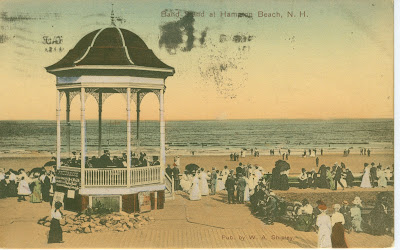
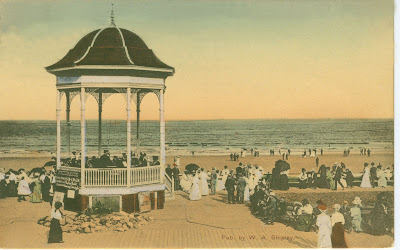
Below is a great vintage postcard image of Hampton Beach, NH postmarked in 1916. Wear and tear is evident, and the post office was clearly not careful with its postmarking ink.

Below is the "cleaned up" version of a scan of the image that used only two tools in the Photoshop Elements toolbox and took less than 5 minutes to complete. The tools used were the "Zoom" tool and the "Clone Stamp" tool.

I will briefly describe how the "Zoom" and "Clone Stamp" tools were used to "clean" this digital image.
1) The vintage postcard, which could have been a vintage photo, was "imported" into the edit area of photoshop elements by using file > import, and selecting my 3 in 1 printer as the source for the scan. I selected a 600 ppi resolution as I may want to print an enlargement one day, and this will provide plenty of flexibility.
2) Among the tools in the toolbox, the "zoom" tool icon is shaped like a magnifying glass. Clicking on this tool and then the choice to increase size, I can magnify the onscreen image to assess needed repairs, and make the repairs on a magnified image. I can easily increase or decrease magnification to see overall progress.
3) I then selected the "Clone Stamp" tool to make repairs to areas needing edits. The basic idea is to take a sample of an area in the image that is satisfactory and then to stamp a clone image of the sample onto the area in need of repair. The clone stamp tool provides a choice of many sizes and densities of samples with a windows right click.
4) In this example, most of the damage in the postcard image was found in the pinkish and blue areas of the sky. Using a windows version of elements, I would simply sample a pinkish area of the sky by using Alt Click, and then Click in the pinkish area to be repaired. Likewise, I would sample a blue area of the sky to "clone" that color onto a blue area in need of repair. This takes a bit of practice. However, by the second or third picture or image, you will be amazed at how easy the tool is to use, and how effective the "clone stamp" tool is in making smoothly transitioning repairs. Save the original scan before you begin the repair. If you make a mistake, you still have the original scan to open. You can then experiment confidently until you have the technique mastered.
To read more about features available, see the product description for Adobe Photoshop Elements 8. For more suggestions on scanning, printing, and other family photo topics, visit LocalArchiver.com.
Friday, March 5, 2010
Color Photos and Fading
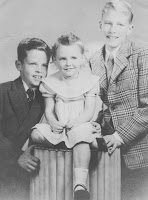
Did you know that many dyes used in color photos as recently as 20 to 30 years ago were relatively unstable, and that color photography became mainstream about 50 years ago?If you have some older color photos, such as the early '60s photo above, you will often notice that some are more faded than others, even when of the same era.
Depending upon the materials used to create the prints, many earlier color prints are quite likely to at least begin to show noticeable fading, even when they have been properly stored.
Therefore, if you want to preserve these color print images as best you can before more visible fading, you might want to consider scanning them. For a discussion of scanning considerations and options, see the Scanning section at LocalArchiver.com.
Monday, March 1, 2010
Storing Family Photos and Documents
Even when most of your family photos and documents are disorganized, and perhaps tucked away in shoe boxes, there are some simple steps that can be taken to help preserve them until you have decided about how to best organize and share them.Understanding some of the major factors that impact the useful life of photo images can help you to take some very simple and inexpensive steps to better preserve your collection until you decide on additional organizing and sharing projects.
Temperature and Humidity - Museums strive to maintain stable and moderate temperatures and humidity levels to protect all sorts of items in their collections, including photos. Extremes can accelerate natural and harmful chemical reactions that lead to deterioration and discoloration. Although museums monitor and target for specific levels of temperature and humidity, the rule of thumb is to store photos and documents at temperature and humidity levels that are comfortable to humans. Therefore, attics, basements, and garages should be avoided. Rather, it is far better to store photos and documents in living spaces.
Ventilation - Certain natural chemical reactions result in chemical fumes that, if not ventilated, may accelerate ongoing reactions and overall deterioration. Therefore, storing collections in areas that have some level of ventilation can be helpful.
Exposure to Light and Pollutants - Clearly exposure to certain types of light can be harmful. Somewhat less obvious is the damage that can be done by pollutants including pollen, dust, mold, smoke, chemical fumes, and others. Some pollutants can scratch or damage surfaces, while others can react with chemicals natural to photos.
There are many additional factors to consider such as the acidity of the boxes in which photos or documents may be stored, and the potentially harmful effects caused by foreign materials often stored with photos and documents such as tapes, glues, rubber bands, paper clips, and other items.
For more information and quick tips on storing photos to delay natural image deterioration, and to avoid preventable deterioration, see the Storing section at LocalArchiver.com. The Preservation Resources section at LocalArchiver.com provides links to a couple of leading sources of archival quality storage solutions.
Thursday, February 4, 2010
Scan Resolutions for the Family Photo Collection
Suggestions for scan resolutions vary widely. Monday, January 25, 2010
Family Photo Organizing - Getting Started is the Hard Part
I constantly talk to people who readily acknowledge their need and desire to better organize, preserve, and share their family photos. However, many also express their fear of what appears to be such a large and potentially challenging project.Much like routine visits to the dentist, family photo organizing projects are seldom as painful as we imagine, and most of us feel particularly good and/or accomplished when we have completed either.
Most people today have family photos in at least two formats. These are digital images taken with newer digital cameras and many photo prints from the days of film cameras.
The most versatile family photo collection is a consolidated and keyword searchable digital image library. Yes, reaching this goal will entail some work. However, with tools and online resources available today, this goal is within easier reach than many may imagine. The powerful ability to search and share such a digital image library opens a wide range of satisfying image preservation and sharing opportunities.
To reach such a goal, you only need two sets of tools.
1.) Tools to organize and store the digital images. All that is needed is a computer together with some image organization software. Several software packages provide the ability to attach searchable "categories" and "key words" to image files. My suggestion is to go with the affordable Adobe Photoshop Elements 8
2.) Tools to digitize your older printed photos. You can scan older printed photos yourself with an inexpensive home scanner or have them scanned professionally. Scanning services are made available at many local photo stores and by several reputable online scanning services. For consistently high quality scans, my suggestion is to use one of the online scanning services that make use of state-of-the-art equipment and often offer higher resolution scans.
You will quickly realize that getting started is the hardest part of the project. To make the task simpler, keep in mind that scanning older prints and organizing digital files can be done in incremental steps.
- You can start by sending a handful of older prints to be scanned to convince yourself that the quality of the scans and customer service is acceptable. You can then segregate the returned prints as backups and add the new scans to your digital library.
- You can start organizing your digital image library with a simple form of "categories", perhaps decades, family, travel, etc.. Then at a later date, you can add keywords describing subjects in more detail so that your searchable image library becomes even more powerful and useful over time.
Give it a try! Organizing your family photos, particularly in smaller steps, will not be as painful as you may think, and you will feel great as you make progress.
Once you have some of your digital image library organized, you will see the incredible possibilities to preserve photo images and better share them with extended family and friends. Themed photo books, collages, slideshows, gift items, and the list continues to grow.
For suggestions on sorting and culling older prints, using scanning services, organizing a digital image library, and other related topics, visit LocalArchiver.com.
Friday, October 30, 2009
Family Photos - Priceless Memories at Risk
Family photo collections contain priceless images that bring back vivid memories of family joys, milestones, trips, and other moments deemed worth preserving.With changes in technology, the "bad news" is that many families now have combinations of photos in older acidic and deteriorating albums, loose photos and transparencies in multiple boxes, and a ton of digital images on a hard drive or CD. This mix of formats is enough to lead many of us to inaction, which places many of these family photo images at risk.
The "good news" is that these very same advances in technology have created the means to easily consolidate, organize, and more broadly share your priceless family photo images.
Clearly a well organized digital image library of family photos provides the greatest opportunity to take advantage of online services and software that can easily and inexpensively create slide shows, photo books, collages, image gift items, and a dozen other satisfying ways to share family photo memories.
As a first step to consolidating older prints or slides into a digital image library, it is necessary for someone to scan the print or slide. Many families hold the view that this is something they should do at home. They then become challenged with the lack of technical expertise, or by not being able to find the time necessary to get organized and to actually complete the scans.
It is clearly easier to have someone perform the scans for you, and there are well established services that will complete your scans for you with little preparation required on your part. A little culling of bad or duplicate prints can save you some money, but you can simply send a shoebox without any sorting or culling. The cost of these services is very reasonable when you consider the benefits of preserving your priceless family memories and the value of being able to creatively use the digitized images in a multitude of image projects in the future. The cost of having your scans done professionally is very inexpensive when considered against the potentially high cost of doing nothing.
To get started, it is not necessary to send your entire collection to be scanned. Although volume discounting is available, it may actually be easier to get your head around sending a few old prints to a professional scanning company to satisfy yourself about the level of service, the quality of scans, and the reasonableness of pricing. To better understand the services and pricing of a couple of the major scanning services, visit ScanDigital and ScanCafe.
It is likely that once you get started, momentum will build. I am confident that once you have begun to create a consolidated family photo digital image library, you will see a range of expanded sharing possibilities that will excite you.
For more information about organizing, preserving, and sharing family photos, visit http://www.localarchiver.com/.
Friday, September 18, 2009
Family Photo Storage - Some Major Environmental Factors
Despite the good intentions of many families to better organize family photo prints, stacks of photo prints are often stored in unfriendly environments.Until they get around to organizing the photo print collection, it is useful for them to understand that some things can be done quickly and easily to prolong the useful life of the images.
Most deterioration of the paper, pigments, and binders used for older prints is attributable to chemical reactions. Therefore, any effort to minimize or slow these chemical reactions is helpful. The attic, basement, and garage are simply not good places to store photo prints.
Major environmental factors related to these locations include:
Temperature - Museums strive to maintain temperatures of roughly 70 degrees Fahrenheit. Although it may not be possible to control temperature as precisely as a museum, the further outside of a human comfort zone, the greater the risk to your collection. Extremes and dramatic swings in temperature damage the paper and other materials in photos and documents by accelerating chemical reactions and/or by expansion and contraction.
Humidity - Museums typically strive to maintain a relative humidity of 50%. Particularly in combination with temperature extremes, humidity both initiates and accelerates many chemical reactions. High humidity can also create an environment conducive to mold and mildew, a situation that can cause rapid deterioration and irreversible damage.
Pollutants - Pollutants include a broad range of substances or objects that cause or accelerate chemical reactions, or create an increased risk of abrasion or other surface damage. These pollutants include dust, smoke, fumes from cleaning materials, chemicals and acids present in improper storage materials, and many glues and tapes used to mount and display images. Even fumes being created by natural chemical reactions in unventilated storage can accelerate other chemical processes. Clean storage areas, reasonable ventilation, and proper archival storage materials reduce the risks associated with most pollutants.
Pests - Insects and rodents may choose to take up residence in certain types of paper. Worse yet, they may perceive the collection to be a food source. The best way to avoid pest damage is to periodically inspect the collection in order to detect and resolve a pest problem early.
Exposure to Light - Museums go to extraordinary lengths to control exposure of collections to certain types of light. Many types of lighting, particularly direct sunlight, impact chemical reactions of the different materials that may be contained in displayed objects, and fade or discolor images in a meaningful way. Careful placement of displayed images, rotation of collections, use of special lighting, and day-to-day display of duplicates, are some of the many techniques used to control the level of exposure to harmful light.
Therefore, at a minimum, photo print collections should be stored in areas of the house that feel comfortable to the home owners. It is better to store the prints in a closet than in an attic, garage, or basement, as the temperature and humidity is likely to be closer to museum standards and more consistent in the closet. It is also important to eliminate obvious pollutants such as paper clips and rubber bands. Use of proper storage materials such as acid free envelopes and boxes will also help to prolong the useful life of the prints.
For additional tips and resource suggestions on family photo and document storage, organization, and image sharing, visit LocalArchiver.com.
Wednesday, September 9, 2009
Organizing Family Photos - Hysterical Preservation and the 80/20 Rule
With limited time and budgets, families and others hoping to preserve a historical heritage in photos and documents often have a difficult time drawing the line between what is important to preserve and what can be preserved.Many preservationists have been referred to as "hysterical preservationists" when they appear to take the position that most or all things historic should be preserved. The "hysterical " approach is often criticized as spreading resources and attention too thin, to the detriment of truly special and unique objects of historical significance.
I believe that the same debate can be applied to family photo and document collections. If a collection consists of boxes of photos or "keepsakes" in an attic, there is a decent probability that someone named in your will could be even less motivated to sort and cull the image collection than you are.
On the other hand, if you approach a culling and organizing project as an application of the 80/20 rule, it is much easier to make some decisions and real progress. In a recent culling project of family photos around our house, we tossed about 80% by volume of our old prints.
We determined that uniqueness and mediocrity were the most obvious criteria. We simply decided that we did not need to keep all of the mediocre shots of a trip to the Grand Canyon in 1975. A couple of the better shots of us with the canyon in the background were sufficient to recall a memorable trip in our younger years. Likewise, multiple shots of a young child in a Halloween costume could be easily reduced to the single best shot.
Uniqueness and historical significance can also be measured differently over time. Historical photos of people may only have had significance to the people in the picture at the time. If people in a picture were engaged in some activity that has historical significance, perhaps the activity is the uniqueness to future generations.
In any case, the person who is culling, sorting, and organizing images is likely the person most qualified to judge uniqueness and historical significance. Keep in mind that you are not just sorting and organizing the collection for yourself, you are also helping those who will inherit the images in the future.
If based on the best judgement of the sorter, roughly 20% of the collection ends up properly sorted, organized, and captioned, the most unique and historically significant photos and documents are much more likely to survive and be shared into the next generation.
For more suggestions on culling and organizing photo and document collections, see the article on Organizing Photo and Document Collections.
Friday, September 4, 2009
Family Photo Sharing in The Digital Age
There are now so many creative ways to share digital family photo images. If you have not yet tried some of the popular online photo image services, you likely can not grasp the range of possibilities.In days past, we would ultimately remember to take that roll of film to be developed and perhaps order double prints so that we could share photos with at least one friend or another family member. Less often we would take a negative to have additional prints made. This is the reason many of us have older one-of-a-kind prints that others would like to have as well.
Now most of us have more recent subjects as digital image files on our computers. Many of us send downsized copies via email or post these in an online album and send a link for a quick look by friends and relatives.
Older relatives without easy access to email or the internet, and those who simply can not be bothered, are now often left out of the image sharing flow.
By easily uploading your images to an online gallery, you can then order inexpensive prints for hard copy display and sharing, create photo books, and access a broad range of other image based products.
My favorite online printer is Shutterfly.com based on its breadth of products and cutting edge services, including its share sites. Uploading and storing your digital images is free. Then you or others ordering prints and image products pay only for orders placed. Your relatives who want a print can place the order and pay themselves. If you know a relative without access to the digital photo album would want a print, you can order one for them and have it delivered directly. Prints are typically shipped within two days, and there is an option to pick up 4x6 prints at local Target stores.
It is also easy to take your best older one-of-a-kind prints and turn them into digital files that can then be added to your online gallery and/or used in other family photo projects.
If you do not have the time, energy, expertise, or equipment to scan your older prints, check out the services of ScanDigital.com.
If you are hesitant to create an online album because you have so many old prints and digital files on your computer, try one of the online services such as Shutterfly with just a handful of images. Once you realize how easy the process can be and experience the flexibility and convenience, you are likely to become more motivated to grab a second handful. You will also begin to see the many sharing possibilities more clearly.
For more family photo sharing guides and project ideas, visit LocalArchiver.com.
Wednesday, September 2, 2009
Preserving Family Photos and Documents - Archival Paper Basics
Understanding the basic archival qualities of paper is useful in understanding how long a family photo or document might last, and to better select proper paper storage products.Most paper produced since the late 1800s has been produced using wood pulp, an inherently acidic material. The quality of paper made from wood pulp often equates to how many steps are taken in the manufacturing process to reduce the acidity of the paper and to improve the chemical stability of better quality papers.
This is why we see rapid deterioration of cheaper paper materials such as newsprint, which remains highly acidic. This rapid deterioration is the result of chemical reactions, which are accelerated by light, heat, and humidity.
There are some labeling terms often used with paper products, which provide clues to the appropriateness of using paper for archival storage purposes.
Be cautious as you see these terms, as suppliers' definitions of archival qualities vary. In any case, if you can become satisfied that paper being used for reproductions and storage are chemically stable, your preservation efforts are improved.
pH Balanced - A chemically neutral paper is typically described as pH balanced. This paper will have a pH between 7.5 and 10. A pH of 7.5 is often referred to as "balanced" and a pH of 10 is often associated with "archival".
Buffered - Paper is referred to as buffered when it is manufactured to contain a small amount of Calcium Carbonate to act as a barrier to acid contamination. The calcium carbonate is typically in the range of 2%.
Acid Free - The term acid free is used to suggest a very low acidic content. In paper content descriptions, this is often denoted as the % of lignin content. Lignin is an acidic compound present in wood. Therefore, a very low lignin content percentage is indicative of a low acid content, and is often described as acid free.
Archival - Materials are best described as archival when the pH approaches 10, and lignin is not present. However, you may see materials described as archival when pH is above 7.5, only small percentages of lignin are present, and materials are buffered.
Although many products sold through mass marketers are labeled archival or such, the best way to be certain of labeling is to buy from sources that are experienced with these materials. Dick Blick Art Materials has a dedicated archival materials department and Archival Methods provides a broad range of archival storage products, and provides custom solutions as well.
Tuesday, August 25, 2009
Photo Fading Factors - A Reason to Consider Having Your Photos Printed Online
Inkjet printers are the most common choice for home photo printing, and printer manufacturers have made great strides in providing relatively inexpensive equipment to satisfy home printing needs. Compared to just a few years ago, we can now create astonishing photo prints at home with available color and resolution capabilities.However, a risk that we should all be aware of is the permanence of the image we print at home. Each printer manufacturer and office supply company offers us a complex choice of inks to feed our printers, and each of these have varied qualities that impact the original printed image and how long it will survive before colors shift and fade. Equally mysterious is the wide choice of papers to place beneath the ink image as these papers also deteriorate and will perhaps impact the inked image above.
In order to be confident that your home prints will last as long as possible, you would need to learn the language of paper and ink quality characteristics and conduct some comparative research. Wilhelm Imaging Research is the best know image permanence testing organization, and they publish test results for many brand name inks and papers. Better papers and inks can be expected to reflect a higher cost. This is something to consider the next time you reach for bargain private label photo paper at your local office supply superstore.
On the other hand, large online printers such as Shutterfly.com need to be able to satisfy the questions and printing needs of their most sophisticated professional photographer customers. The online printers' professional staff and buying clout allow them to identify and purchase the best materials for initial and long lasting quality. It is also important to note that processes used by major online printers are simply not the same as those available in the home.
Although printing at home may provide some instant gratification and you may like the apparent added control over the editing and printing process, you are probably not using materials that will maximize the enjoyment of the image by you and perhaps future generations. The effort to identify the best materials for your home printer combined with the added cost of these materials may actually exceed the cost of having your prints made professionally. Even if you use quality materials at home, you may still not attain the same consistent high quality available through major online printers.
For a description of materials used by at least one major online printer, go to Shutterfly.com, use the menu near the page top to access "help" and then search on "Photographic Print Durability" once in the help section.
It is clearly useful to have a photo printing capacity in the home for many photo projects. However, if the purpose of printing a photo includes the goal of long lasting enjoyment, perhaps into future generations, one should consider the image permanence issues raised above, and at least explore having the print made professionally and conveniently by a major online printer.
For a broader discussion of printing photos, read the article titled Printing Quality Photo and Document Digital Images at LocalArchiver.com.
Friday, August 14, 2009
Feedback on Photo and Document Preservation and Sharing Topics Most Welcomed
This blog and its related website, LocalArchiver.com, have now been up and running for about three months. In addition to starting this blog in June, articles have been added to the LocalArchiver.com website and additional features such as print friendly pages and the ability to email page links to others are now available.I am receiving some welcomed feedback on the usefulness of the site. This feedback is much appreciated, as it is the primary way of knowing whether others are finding the website content useful. This feedback also lets me know that the site is beginning to meet its primary goal of helping families and community historical societies save time and money in their efforts to organize, preserve, and share photos and documents in their image collections.
Feedback to date has been positive. Some kind excerpts from emails include:
"Great job on developing a user friendly and informative web
site."
"...Your site is fabulous! I just checked out your blog, too. Very nice. Extremely informative, too.... I have fallen heir to a great deal of very old photographs and letters. You're helping me preserve things as they ought to be. I'm forever grateful for that. "
"I don't know how I stumbled on your site but thankfully I did! ......I still have a long way to go but I have a much clearer vision now and feel the weight has lifted from my shoulders. A HUGE thank you! Your site, resources and links are wonderful...."
Feedback such as this has helped me to feel that I am on the right track and that some visitors are finding the content at LocalArchiver.com useful.
I ask that visitors also let me know what they feel is missing, inaccurate, or unclear. Many of the topics in the website are subject to ongoing debate (best scanning resolutions, best number of pixels for quality print resolution, etc., etc.). The LocalArchiver.com offers what it considers to be the best information available, consolidated and presented in a way to be useful to a non-professional.
Clearly, the "rightness" of a given solution is somewhat dependent on circumstances. The "correct" image capture resolution and digital file format selection will likely be different for a family vacation photo and a professional landscape photo.
Likewise, a large urban museum with a full time professional staff will likely catalog collection images differently than a community historical society. Please keep providing feedback, both positive and constructive, so that we can jointly make LocalArchiver.com as useful as possible, and to represent the varied views of visitors to this blog and to LocalArchiver.com.
Monday, August 10, 2009
Family Memories and Color Photo Prints Fade Together
Due to differences in materials and processes used, family color photo prints begin to show deterioration much more rapidly than older black and white photo prints. For a relatively concise explanation of why, read A Consumer Guide to Traditional and Digital Print Stability at the Image Permanence Institute website.In short, the dyes, pigments, and other materials used to create color photo prints are inherently less stable than those used in black and white prints, and the materials and processes vary more widely. Therefore, it is generally agreed that noticeable fading and color shifts are possible within roughly 50 years, even when prints are properly handled and stored.
Color photo prints became widely available in the 1950s. Therefore, most families are likely to have some portion of their collection demonstrating this color photo print instability, and they can expect to see additional deterioration of aging color prints in the future.
The Image Permanence Institute article suggests that "Color prints, not electronic files, are the best way to ensure that digital images will be preserved for future generations."
I agree that understanding the optimal print technology, storage, and handling of color prints is important, particularly when a decision is made to display prints in albums, scrapbooks, and elsewhere in the home.
However, I believe that creating digital scans of older color prints before they show fading, and properly managing newly created digital files is the best way to preserve and share these images with current and future family generations. In addition to expanded ways to share and distribute the images once in digital format, I believe that we can be confident that clever people will develop ways for us to easily transition digital family history images from generation to generation.
Clearly one should create backups of digital files to avoid complete loss in the event of equipment failure. However, backups of photo prints is equally important, as these are subject fire, floods, and other calamity as well.
Digital file formats, digital storage media, and the technology used to view the digital images will undoubtedly change over time. However, this will not happen overnight. Further, I am willing to bet that my descendants will be smart enough to see these changes coming and transfer family digital image information to evolving technology. I also suspect that there will be competitive business services to help them. There are still a lot of ways to transfer old 8mm movies to DVD, and I am confident that there will be inexpensive and readily available ways to transfer CD and DVD information to the next and subsequent generations of storage media. There are simply too many digital jpeg images on hard drives, CDs, and DVDs to think that these digital images are at greater risk than prints.
I also believe that the transfer of family history images can be made easier and more likely by placing the images in the proper digital format and distributing multiple copies now. Regardless of the care taken to prolong the useful life of one-of-a-kind color prints, many will be faded in another generation or two, and will become more likely to simply be tossed as faded old photos that were not properly captioned and indexed as digital files.
For more suggestions on organizing, preserving and sharing family photos, visit LocalArchiver.com.
To explore creating digital files of your older color prints, or your entire photo print collection, visit ScanDigital.com.
Wednesday, August 5, 2009
Now is a Good Time to Plan Off-Season Photo and Document Preservation and Sharing Projects
The summer months always seem a bit busier than other seasons of the year. Families travel, vacation, attend reunions, and participate in a broad range of other seasonal pleasures with friends and extended family. The end result is likely an increase in the many photo images that are already on the shelf or in the computer, and the number of photos that you hope to organize and share someday. Families may not have time to take on a major photo organizing and sharing project during the hectic summer. However, thinking about your off-season project goals now can be helpful later.
As you capture memories of a trip, you may think about how to best caption and arrange a photo book to tell the story of the trip. Keeping a short journal of the trip may be helpful. As you attend reunions, you may want to talk to other family members about how to coordinate the sharing of one-of-a-kind photos held by others. You might find out that a particular family member has a growing interest in starting a genealogy project, and another is already interested in organizing and sharing extended family photos. A family discussion of such things can lead in interesting directions.
Volunteers at community historical societies are often quite busy with summer season fund raising fairs, extended collection viewing hours, and perhaps building or display renovations.
However, chances are that volunteer interest and participation are at a peak, and some discussions about off-season projects can be very fruitful.
When extended family and historical society member interest in photos and other images is at a peak, establishing some preliminary photo and document preservation and sharing project plans for the off-season can provide some momentum into the slower off seasons.
For additional "HowTo" information, and family and community historical society project ideas, visit LocalArchiver.com.
Friday, July 17, 2009
Prepaid Scanning - Unlock the Family Photos Being Held Captive
Even with the best of intentions, the sibling or cousin may just not get around to sorting and/or scanning the images for distribution.
I was chatting with a friend over a barbecue grill last night and he mentioned that a cousin had several of his childhood photos held captive. He had previously offered to buy the cousin a scanner to get her started, but he was not taken up on the offer.
As an alternative, I suggested that he canvas other family members who may feel the same way and that he ask them to contribute to a bulk prepaid scanning plan at one of the major scanning services.
I suggested that for the price of a nice dinner, he and some other family members can get their hands on all of the photo images held captive by the good intentioned, but procrastinating cousin.
Both ScanDigital and ScanCafe have programs which allow someone to purchase prepaid scanning. The scanning services will then send a gift card or even a box to the cousin or sibling with instructions to simply fill it up and use the pre-printed mailing label.
What could be simpler for my friend? What could be easier for the cousin? What could be more important for you?
This pre-paid service as a gift for parents is also a great way to get the family photos preserved and shared before they wind up with a single sibling or cousin.
For additional thoughts on scanning images, and photo preservation and sharing, visit LocalArchiver.com.